Ver.26.1.11
Component versions ▾
A redesigned login page and home page
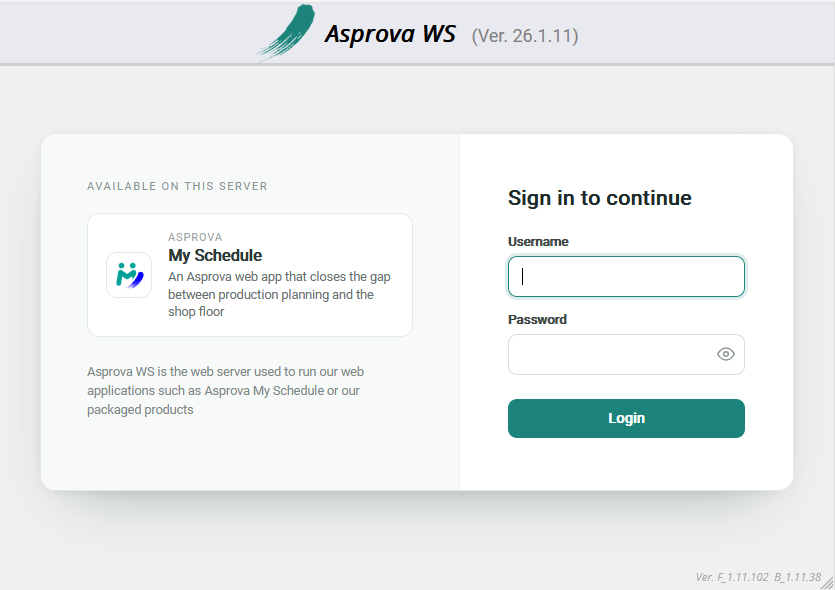
The login page has been redesigned. It now shows the neutral "Asprova WS" branding — the server that hosts My Schedule — instead of "Asprova My Schedule", next to a panel listing the products this server provides. For now, My Schedule is the only product that can appear there.
The home page's design has also changed in places.
Improvements and Bug Fixes
- (Feature) The table area of Resource Gantt and Order Gantt charts now follows the text color set in Asprova. The Resource left-side text color expression and Order left-side text color expression style settings are reflected, alongside the left-side text and background color expressions already supported. This requires Asprova 18.1.0.96 or later; on earlier versions the text keeps its previous color.
- (Improvement) My Schedule project pages now open under a
/my-schedule/address, for example/my-schedule/projects/.... Existing/projects/...links and bookmarks redirect there automatically, so saved links keep working. - (Improvement) The browser tab title and icon now follow the page you are viewing. Pages of a project that has My Schedule assigned show "Asprova My Schedule" with the My Schedule logo, and the home page shows the neutral "Asprova WS" branding.
- (Fix) On the Operation Table, pressing a Start or End button no longer leaves two result date-times in the cell. (from v.26.1.10)
- (Fix) On Resource Gantt charts, the calendar header no longer disappears after switching to another view and back.
- (Fix) Project pages now enforce access control. The project admin page requires Project Admin permission, and every other project page requires you to be assigned to the project; previously any signed-in user could open them. Users without sufficient permission now see a clear "insufficient permission" message.
- (Improvement) The project settings page now shows a user's display name, with the username in parentheses, in the project users list and in the invitation dialogs. User search in the invitation dialog now matches the display name as well.
- (Fix) When the license's project count refuses a project write, the message now names the limit that was reached.
- (Fix) When the server could not be reached — while changing a project's settings, for example — this is now reported.
- (Fix) The concurrent user (CCU) count is now kept per session rather than per browser cookie, so signing out reliably frees the slot the user held. Previously a client that arrived without the cookie and issued several requests at once could take one slot per request, and signing out released only one of them — the rest stayed occupied until they timed out 15 minutes later.
- (Feature) Removing a user now also frees the concurrent user slots their sessions were holding, instead of leaving them occupied for 15 minutes with nobody left who could sign out to release them.
- (Improvement) When signing in with an Asprova ID to use an online license, the error message now explains the actual cause — a wrong Asprova ID or password, no internet connection, a rejected corporate or proxy certificate, a proxy problem, or a server error — instead of a generic "Failed to login". The underlying technical code is included.
- (Improvement) The server's own outbound HTTPS now trusts the certificates installed in the machine's Windows certificate store. Where a corporate CA or a TLS-inspecting proxy is in use, online license authentication succeeds as long as that certificate is installed there — no configuration is needed. See Trusting a corporate CA certificate.
- (Improvement) A new
extra_ca_certsconfiguration option takes the path to a PEM file, for a CA certificate that cannot be installed in the Windows certificate store. Its certificates are trusted in addition to that store, not instead of it. - (Improvement) On the server settings page, the alert shown for an e-Protector that cannot be used now appears in the display language.
- (Fix) Maintenance mode is now re-evaluated when a project is created or deleted, not only when a project's plan changes. Previously, deleting the project that pushed the server past its license limit did not lift maintenance mode until the next license re-verification or a server restart.
- (Improvement) The frontend and the bundled documentation are now served with
Cache-Control: no-cache, so a browser revalidates them on every page load. Previously a returning browser could keep loading a cached page for days after the server had been updated. - (Security) The application is now hardened against HTML injection in text that comes from project data or configuration, such as a project name. Such text is always shown literally.